# Kontakt-Import

Die Import-Schnittstelle von ounuo bietet Ihnen eine komfortable Möglichkeit, bereits vorhandene Kontaktdaten aus externen Programmen wie Excel®, Cobra® oder anderen Systemen schnell und strukturiert in ounuo zu übernehmen. So sparen Sie Zeit und vermeiden manuelle Eingabefehler.
Hier erfahren Sie:

was eine Import-Schnittstelle ist und wie sie funktioniert,
wie Sie Ihre Daten optimal vorbereiten,
wie das Mapping der Felder erfolgt,
und wie Sie den Import Schritt für Schritt durchführen.

Ob manuell oder automatisiert - mit der Import-Schnittstelle behalten Sie die Kontrolle über Ihre Daten und sorgen für einen reibungslosen Übergang ins ounuo-System.

# Import-Schnittstelle

<span style="color: rgb(0, 0, 0);">Die Import-Schnittstelle von ounuo ermöglicht es Ihnen, bestehende Kontaktdaten schnell und sicher in das System zu übertragen. Das ist besonders hilfreich, wenn Sie bereits Daten in anderen Programmen wie Excel®, Cobra®, usw. haben</span>

## <span style="color: rgb(20, 137, 167);">Was ist eine Import-Schnittstelle?</span>

<span style="color: rgb(0, 0, 0);">Eine Import-Schnittstelle ist eine definierte Möglichkeit, Daten oder Informationen von einem externen System in ein Zielsystem zu übertragen. Sie dient dazu, Daten automatisiert, strukturiert und fehlerfrei zu übernehmen.</span>

### <span style="color: rgb(20, 137, 167);">Typische Merkmale:</span>

- <span style="color: rgb(0, 0, 0);">**Datenformat:** Die Schnittstelle erwartet bestimmte Formate wie CSV oder Excel</span>
- <span style="color: rgb(0, 0, 0);">**Validierung:** Die Daten werden beim Import ggf. geprüft (z.B. auf Vollständigkeit oder Richtigkeit)</span>
- <span style="color: rgb(0, 0, 0);">**Mapping:** Felder aus der Quelldatei werden den Feldern im Zielsystem zugeordnet</span>

## <span style="color: rgb(20, 137, 167);">Was ist das Mapping?</span>

<span style="color: rgb(0, 0, 0);">Das Mapping beim Datenimport ist der Prozess, bei dem Felder aus einer Importquelle (z.B. CSV, Excel) den entsprechenden Feldern im Zielsystem zugeordnet werden. So wird sichergestellt, dass die Daten korrekt und sinnvoll übernommen werden.</span>

### <span style="color: rgb(20, 137, 167);">Wie funktioniert das Mapping?</span>

<span style="color: rgb(0, 0, 0);">(eine ausführliche Liste finden Sie auf den nächsten Seiten)</span>

<table border="1" id="bkmrk-1.-quellstruktur-ana" style="border-collapse: collapse; width: 100%; border-width: 0px;"><colgroup><col style="width: 100%;"></col></colgroup><tbody><tr><td style="border-width: 0px;"><span style="color: rgb(0, 0, 0);">**1. Quellstruktur analysieren**</span>  
</td></tr><tr><td style="border-width: 0px;"><span style="color: rgb(0, 0, 0);">Die Struktur der Import-Datei wird geprüft</span></td></tr><tr><td style="border-width: 0px;"><span style="color: rgb(0, 0, 0);">**2. Zielstruktur definieren**</span>  
</td></tr><tr><td style="border-width: 0px;"><span style="color: rgb(0, 0, 0);">Das Zielsystem hat eigene Felder, z.B.: Name, Anrede, Kundennummer, usw. ...</span>  
</td></tr><tr><td style="border-width: 0px;"><span style="color: rgb(0, 0, 0);">**3. Zuordnung (Mapping) erstellen**</span>

</td></tr><tr><td style="border-width: 0px;"><span style="color: rgb(0, 0, 0);">Jetzt wird festgelegt, welches Feld aus der Quelle zu welchem Feld im Zielsystem passt:  
</span>

</td></tr><tr><td style="border-width: 0px;"><table border="1" style="border-collapse: collapse; width: 100.122%; border-width: 0px; height: 143.984px;"><colgroup><col style="width: 50%;"></col><col style="width: 50%;"></col></colgroup><tbody><tr style="height: 28.7969px; background-color: #b3d9ff;"><td style="border-width: 0px; height: 28.7969px;"><span style="text-decoration: underline; color: rgb(0, 0, 0);">**Quellfeld (CSV / Excel)**</span>  
</td><td style="border-width: 0px; height: 28.7969px;"><span style="text-decoration: underline; color: rgb(0, 0, 0);">**Zielfeld (ounuo)**</span>  
</td></tr><tr style="height: 28.7969px; background-color: #ffffff;"><td style="border-width: 0px; height: 28.7969px;"><span style="color: rgb(0, 0, 0);">Vorname</span>  
</td><td style="border-width: 0px; height: 28.7969px;"><span style="color: rgb(0, 0, 0);">FIRSTNAME</span>  
</td></tr><tr style="height: 28.7969px; background-color: #e0e0e0;"><td style="border-width: 0px; height: 28.7969px;"><span style="color: rgb(0, 0, 0);">Nachname</span></td><td style="border-width: 0px; height: 28.7969px;">LASTNAME</td></tr><tr style="height: 28.7969px; background-color: #ffffff;"><td style="border-width: 0px; height: 28.7969px;"><span style="color: rgb(0, 0, 0);">Privat Telefon</span>  
</td><td style="border-width: 0px; height: 28.7969px;"><span style="color: rgb(0, 0, 0);">HOMEPHONE</span>  
</td></tr><tr style="height: 28.7969px; background-color: #e0e0e0;"><td style="border-width: 0px; height: 28.7969px;"><span style="color: rgb(0, 0, 0);">Privat E-Mail</span>  
</td><td style="border-width: 0px; height: 28.7969px;"><span style="color: rgb(0, 0, 0);">HOMEEMAIL</span>  
</td></tr></tbody></table>

</td></tr></tbody></table>

<div class="callout info" id="bkmrk-merke%3Amapping-%3D-welc" style="display: flex; align-items: flex-start; gap: 10px; background-color: #e0f0ff; color: #003366;"><div>**Merke:**  
Mapping = Welches Feld gehört wohin?  
Match = Gibt es diesen Wert schon irgendwo?</div></div><div id="bkmrk-">  
</div><div id="bkmrk--1"></div>![](https://docs.ounuo.de/uploads/images/drawio/2025-02/drawing-5-1739436327.png)

## <span style="color: rgb(20, 137, 167);">Das könnte Sie auch interessieren:</span>

- [<span style="color: rgb(20, 137, 167);">Dublettenverwaltung</span>](https://docs.ounuo.de/link/133)

# Felddefinitionen

<span style="color: rgb(0, 0, 0);">Damit der Import Ihrer Kontaktdaten in ounuo reibungslos funktioniert, ist es wichtig, die Felder in Ihrer CSV-Datei korrekt den entsprechenden ounuo-Feldern zuzuordnen. Diese sogenannten Felddefinition sorgt dafür, dass alle Informationen - von Namen und Adressen bis hin zu Organisationsdaten und Gruppen - an der richtigen Stelle im System landen.</span>

<table border="1" id="bkmrk-ounuo-feld-import-sp" style="border-collapse: collapse; width: 108.571%; border-width: 1px; height: 1456.83px; border-color: rgb(206, 212, 217);"><colgroup><col style="width: 23.0036%;"></col><col style="width: 25.149%;"></col><col style="width: 20.6317%;"></col><col style="width: 31.2157%;"></col></colgroup><tbody><tr style="height: 46.5938px; background-color: rgb(179, 217, 255);"><td style="border-width: 1px; height: 46.5938px; border-color: rgb(206, 212, 217);"><span style="color: rgb(0, 51, 102);">**ounuo Feld**</span></td><td style="border-width: 1px; height: 46.5938px; border-color: rgb(206, 212, 217);"><span style="color: rgb(0, 51, 102);">**Import Spalte CSV-Datei**</span></td><td style="border-width: 1px; height: 46.5938px; border-color: rgb(206, 212, 217);"><span style="color: rgb(0, 51, 102);">**Beispiel**</span></td><td style="border-width: 1px; height: 46.5938px; border-color: rgb(206, 212, 217);"><span style="color: rgb(0, 51, 102);">**Bemerkungen**</span></td></tr><tr style="height: 29.7969px; background-color: rgb(255, 255, 255);"><td style="border-width: 1px; height: 29.7969px; border-color: rgb(206, 212, 217);"><span style="color: rgb(0, 0, 0);">Anrede</span></td><td style="border-width: 1px; height: 29.7969px; background-color: rgb(224, 240, 255); border-color: rgb(206, 212, 217);"><span style="color: rgb(0, 0, 0);">SALUTATION</span></td><td style="border-width: 1px; height: 29.7969px; border-color: rgb(206, 212, 217);"><span style="color: rgb(0, 0, 0);">Frau</span></td><td style="border-width: 1px; height: 29.7969px; border-color: rgb(206, 212, 217);">  
</td></tr><tr style="height: 63.3906px; background-color: rgb(224, 224, 224);"><td style="border-width: 1px; height: 63.3906px; border-color: rgb(206, 212, 217);"><span style="color: rgb(0, 0, 0);">Anrede in Anschreiben<sup>(1)</sup></span></td><td style="border-width: 1px; height: 63.3906px; background-color: rgb(208, 224, 240); border-color: rgb(206, 212, 217);"><span style="color: rgb(0, 0, 0);">SALUTATIONMANUAL</span></td><td style="border-width: 1px; height: 63.3906px; border-color: rgb(206, 212, 217);"><span style="color: rgb(0, 0, 0);">Hallo Anja</span></td><td style="border-width: 1px; height: 63.3906px; border-color: rgb(206, 212, 217);"><span style="color: rgb(0, 0, 0);">Nur relevant, wenn eine manuelle Anrede von der automatisch generierten Anrede abweichen soll.</span></td></tr><tr style="height: 29.7969px; background-color: rgb(255, 255, 255);"><td style="border-width: 1px; height: 29.7969px; border-color: rgb(206, 212, 217);"><span style="color: rgb(0, 0, 0);">Akademischer Titel</span></td><td style="border-width: 1px; height: 29.7969px; background-color: rgb(224, 240, 255); border-color: rgb(206, 212, 217);"><span style="color: rgb(0, 0, 0);">TITLE</span></td><td style="border-width: 1px; height: 29.7969px; border-color: rgb(206, 212, 217);"><span style="color: rgb(0, 0, 0);">Dr.</span></td><td style="border-width: 1px; height: 29.7969px; border-color: rgb(206, 212, 217);">  
</td></tr><tr style="height: 29.7969px; background-color: rgb(224, 224, 224);"><td style="border-width: 1px; height: 29.7969px; border-color: rgb(206, 212, 217);"><span style="color: rgb(0, 0, 0);">Vorname</span></td><td style="border-width: 1px; height: 29.7969px; background-color: rgb(208, 224, 240); border-color: rgb(206, 212, 217);"><span style="color: rgb(0, 0, 0);">FIRSTNAME</span></td><td style="border-width: 1px; height: 29.7969px; border-color: rgb(206, 212, 217);"><span style="color: rgb(0, 0, 0);">Anja</span></td><td style="border-width: 1px; height: 29.7969px; border-color: rgb(206, 212, 217);">  
</td></tr><tr style="height: 29.7969px; background-color: rgb(255, 255, 255);"><td style="border-width: 1px; height: 29.7969px; border-color: rgb(206, 212, 217);"><span style="color: rgb(0, 0, 0);">Nachname</span></td><td style="border-width: 1px; height: 29.7969px; background-color: rgb(224, 240, 255); border-color: rgb(206, 212, 217);"><span style="color: rgb(0, 0, 0);">LASTNAME</span></td><td style="border-width: 1px; height: 29.7969px; border-color: rgb(206, 212, 217);"><span style="color: rgb(0, 0, 0);">Muster</span></td><td style="border-width: 1px; height: 29.7969px; border-color: rgb(206, 212, 217);">  
</td></tr><tr style="height: 29.7969px; background-color: rgb(224, 224, 224);"><td style="border-width: 1px; height: 29.7969px; border-color: rgb(206, 212, 217);"><span style="color: rgb(0, 0, 0);">Organisation/Firma Name</span></td><td style="border-width: 1px; height: 29.7969px; background-color: rgb(208, 224, 240); border-color: rgb(206, 212, 217);"><span style="color: rgb(0, 0, 0);">COMPANY</span></td><td style="border-width: 1px; height: 29.7969px; border-color: rgb(206, 212, 217);"><span style="color: rgb(0, 0, 0);">Beispiel GmbH</span></td><td style="border-width: 1px; height: 29.7969px; border-color: rgb(206, 212, 217);">  
</td></tr><tr style="height: 46.5938px; background-color: rgb(255, 255, 255);"><td style="border-width: 1px; height: 46.5938px; border-color: rgb(206, 212, 217);"><span style="color: rgb(0, 0, 0);">Abteilung in der Organisation</span></td><td style="border-width: 1px; height: 46.5938px; background-color: rgb(224, 240, 255); border-color: rgb(206, 212, 217);"><span style="color: rgb(0, 0, 0);">DEPARTMENT</span></td><td style="border-width: 1px; height: 46.5938px; border-color: rgb(206, 212, 217);"><span style="color: rgb(0, 0, 0);">Marketing</span></td><td style="border-width: 1px; height: 46.5938px; border-color: rgb(206, 212, 217);">  
</td></tr><tr style="height: 29.7969px; background-color: rgb(224, 224, 224);"><td style="border-width: 1px; height: 29.7969px; border-color: rgb(206, 212, 217);"><span style="color: rgb(0, 0, 0);">Position in der Organisation</span></td><td style="border-width: 1px; height: 29.7969px; background-color: rgb(208, 224, 240); border-color: rgb(206, 212, 217);"><span style="color: rgb(0, 0, 0);">POSITION</span></td><td style="border-width: 1px; height: 29.7969px; border-color: rgb(206, 212, 217);"><span style="color: rgb(0, 0, 0);">Abteilungsleiterin</span></td><td style="border-width: 1px; height: 29.7969px; border-color: rgb(206, 212, 217);">  
</td></tr><tr style="height: 46.5938px; background-color: rgb(255, 255, 255);"><td style="border-width: 1px; height: 46.5938px; border-color: rgb(206, 212, 217);"><span style="color: rgb(0, 0, 0);">E-Mail in der Organisation</span></td><td style="border-width: 1px; height: 46.5938px; background-color: rgb(224, 240, 255); border-color: rgb(206, 212, 217);"><span style="color: rgb(0, 0, 0);">BUSINESSMAIL</span></td><td style="border-width: 1px; height: 46.5938px; border-color: rgb(206, 212, 217);"><span style="color: rgb(0, 0, 0);">a.muster@baumfreunde-deutschland.de</span></td><td style="border-width: 1px; height: 46.5938px; border-color: rgb(206, 212, 217);">  
</td></tr><tr style="height: 29.7969px; background-color: rgb(224, 224, 224);"><td style="border-width: 1px; height: 29.7969px; border-color: rgb(206, 212, 217);"><span style="color: rgb(0, 0, 0);">Telefon in der Organisation</span></td><td style="border-width: 1px; height: 29.7969px; background-color: rgb(208, 224, 240); border-color: rgb(206, 212, 217);"><span style="color: rgb(0, 0, 0);">BUSINESSPHONE</span></td><td style="border-width: 1px; height: 29.7969px; border-color: rgb(206, 212, 217);"><span style="color: rgb(0, 0, 0);">+49 (40) 66969101</span></td><td style="border-width: 1px; height: 29.7969px; border-color: rgb(206, 212, 217);">  
</td></tr><tr style="height: 46.5938px; background-color: rgb(255, 255, 255);"><td style="border-width: 1px; height: 46.5938px; border-color: rgb(206, 212, 217);"><span style="color: rgb(0, 0, 0);">Alternatives Telefon in der Organisation<sup>(1)</sup></span></td><td style="border-width: 1px; height: 46.5938px; background-color: rgb(224, 240, 255); border-color: rgb(206, 212, 217);"><span style="color: rgb(0, 0, 0);">BUSINESSPHONE2</span></td><td style="border-width: 1px; height: 46.5938px; border-color: rgb(206, 212, 217);"> </td><td style="border-width: 1px; height: 46.5938px; border-color: rgb(206, 212, 217);">  
</td></tr><tr style="height: 46.5938px; background-color: rgb(224, 224, 224);"><td style="border-width: 1px; height: 46.5938px; border-color: rgb(206, 212, 217);"><span style="color: rgb(0, 0, 0);">Mobiltelefon in der Organisation</span></td><td style="border-width: 1px; height: 46.5938px; background-color: rgb(208, 224, 240); border-color: rgb(206, 212, 217);"><span style="color: rgb(0, 0, 0);">MOBILEPHONE</span></td><td style="border-width: 1px; height: 46.5938px; border-color: rgb(206, 212, 217);"><span style="color: rgb(0, 0, 0);">+49 (171) 3920023</span></td><td style="border-width: 1px; height: 46.5938px; border-color: rgb(206, 212, 217);">  
</td></tr><tr style="height: 29.7969px; background-color: rgb(255, 255, 255);"><td style="border-width: 1px; height: 29.7969px; border-color: rgb(206, 212, 217);"><span style="color: rgb(0, 0, 0);">Fax in der Organisation<sup>(1)</sup></span></td><td style="border-width: 1px; height: 29.7969px; background-color: rgb(224, 240, 255); border-color: rgb(206, 212, 217);"><span style="color: rgb(0, 0, 0);">BUSINESSFAX</span></td><td style="border-width: 1px; height: 29.7969px; border-color: rgb(206, 212, 217);"> </td><td style="border-width: 1px; height: 29.7969px; border-color: rgb(206, 212, 217);">  
</td></tr><tr style="height: 29.7969px; background-color: rgb(224, 224, 224);"><td style="border-width: 1px; height: 29.7969px; border-color: rgb(206, 212, 217);"><span style="color: rgb(0, 0, 0);">Organisation Adresszusatz 1</span></td><td style="border-width: 1px; height: 29.7969px; background-color: rgb(208, 224, 240); border-color: rgb(206, 212, 217);"><span style="color: rgb(0, 0, 0);">EXTRAADDRESSLINE</span></td><td style="border-width: 1px; height: 29.7969px; border-color: rgb(206, 212, 217);"><span style="color: rgb(0, 0, 0);">Beispiel GmbH</span></td><td style="border-width: 1px; height: 29.7969px; border-color: rgb(206, 212, 217);">  
</td></tr><tr style="height: 29.7969px; background-color: rgb(255, 255, 255);"><td style="border-width: 1px; height: 29.7969px; border-color: rgb(206, 212, 217);"><span style="color: rgb(0, 0, 0);">Organisation Adresszusatz 2</span></td><td style="border-width: 1px; height: 29.7969px; background-color: rgb(224, 240, 255); border-color: rgb(206, 212, 217);"><span style="color: rgb(0, 0, 0);">EXTRAADDRESSLINE2</span></td><td style="border-width: 1px; height: 29.7969px; border-color: rgb(206, 212, 217);"> </td><td style="border-width: 1px; height: 29.7969px; border-color: rgb(206, 212, 217);">  
</td></tr><tr style="height: 29.7969px; background-color: rgb(224, 224, 224);"><td style="border-width: 1px; height: 29.7969px; border-color: rgb(206, 212, 217);"><span style="color: rgb(0, 0, 0);">Organisation Adresszusatz 3</span></td><td style="border-width: 1px; height: 29.7969px; background-color: rgb(208, 224, 240); border-color: rgb(206, 212, 217);"><span style="color: rgb(0, 0, 0);">EXTRAADDRESSLINE3</span></td><td style="border-width: 1px; height: 29.7969px; border-color: rgb(206, 212, 217);"> </td><td style="border-width: 1px; height: 29.7969px; border-color: rgb(206, 212, 217);">  
</td></tr><tr style="height: 29.7969px; background-color: rgb(255, 255, 255);"><td style="border-width: 1px; height: 29.7969px; border-color: rgb(206, 212, 217);"><span style="color: rgb(0, 0, 0);">Organisation Straße</span></td><td style="border-width: 1px; height: 29.7969px; background-color: rgb(224, 240, 255); border-color: rgb(206, 212, 217);"><span style="color: rgb(0, 0, 0);">COMPANYSTREET</span></td><td style="border-width: 1px; height: 29.7969px; border-color: rgb(206, 212, 217);"><span style="color: rgb(0, 0, 0);">Waldstraße 1</span></td><td style="border-width: 1px; height: 29.7969px; border-color: rgb(206, 212, 217);">  
</td></tr><tr style="height: 46.5938px; background-color: rgb(224, 224, 224);"><td style="border-width: 1px; height: 46.5938px; border-color: rgb(206, 212, 217);"><span style="color: rgb(0, 0, 0);">Organisation Postleitzahl</span></td><td style="border-width: 1px; height: 46.5938px; background-color: rgb(208, 224, 240); border-color: rgb(206, 212, 217);"><span style="color: rgb(0, 0, 0);">COMPANYPOSTALCODE</span></td><td style="border-width: 1px; height: 46.5938px; border-color: rgb(206, 212, 217);"><span style="color: rgb(0, 0, 0);">20257</span></td><td style="border-width: 1px; height: 46.5938px; border-color: rgb(206, 212, 217);">  
</td></tr><tr style="height: 29.7969px; background-color: rgb(255, 255, 255);"><td style="border-width: 1px; height: 29.7969px; border-color: rgb(206, 212, 217);"><span style="color: rgb(0, 0, 0);">Organisation Ort</span></td><td style="border-width: 1px; height: 29.7969px; background-color: rgb(224, 240, 255); border-color: rgb(206, 212, 217);"><span style="color: rgb(0, 0, 0);">COMPANYCITY</span></td><td style="border-width: 1px; height: 29.7969px; border-color: rgb(206, 212, 217);"><span style="color: rgb(0, 0, 0);">Hamburg</span></td><td style="border-width: 1px; height: 29.7969px; border-color: rgb(206, 212, 217);">  
</td></tr><tr style="height: 29.7969px; background-color: rgb(224, 224, 224);"><td style="border-width: 1px; height: 29.7969px; border-color: rgb(206, 212, 217);"><span style="color: rgb(0, 0, 0);">Organisation Bundesland<sup>(1)</sup></span></td><td style="border-width: 1px; height: 29.7969px; background-color: rgb(208, 224, 240); border-color: rgb(206, 212, 217);"><span style="color: rgb(0, 0, 0);">COMPANYSTATE</span></td><td style="border-width: 1px; height: 29.7969px; border-color: rgb(206, 212, 217);"> </td><td style="border-width: 1px; height: 29.7969px; border-color: rgb(206, 212, 217);">  
</td></tr><tr style="height: 29.7969px; background-color: rgb(255, 255, 255);"><td style="border-width: 1px; height: 29.7969px; border-color: rgb(206, 212, 217);"><span style="color: rgb(0, 0, 0);">Organisation Land</span></td><td style="border-width: 1px; height: 29.7969px; background-color: rgb(224, 240, 255); border-color: rgb(206, 212, 217);"><span style="color: rgb(0, 0, 0);">COMPANYCOUNTRY</span></td><td style="border-width: 1px; height: 29.7969px; border-color: rgb(206, 212, 217);"> </td><td style="border-width: 1px; height: 29.7969px; border-color: rgb(206, 212, 217);">  
</td></tr><tr style="height: 46.5938px; background-color: rgb(224, 224, 224);"><td style="border-width: 1px; height: 46.5938px; border-color: rgb(206, 212, 217);"><span style="color: rgb(0, 0, 0);">Organisation Webseite</span></td><td style="border-width: 1px; height: 46.5938px; background-color: rgb(208, 224, 240); border-color: rgb(206, 212, 217);"><span style="color: rgb(0, 0, 0);">WEBSITE</span></td><td style="border-width: 1px; height: 46.5938px; border-color: rgb(206, 212, 217);"><span style="color: rgb(0, 0, 0);">www.baumfreunde-deutschland.de</span></td><td style="border-width: 1px; height: 46.5938px; border-color: rgb(206, 212, 217);">  
</td></tr><tr style="height: 46.5938px; background-color: rgb(255, 255, 255);"><td style="border-width: 1px; height: 46.5938px; border-color: rgb(206, 212, 217);"><span style="color: rgb(0, 0, 0);">Organisation E-Mail</span></td><td style="border-width: 1px; height: 46.5938px; background-color: rgb(224, 240, 255); border-color: rgb(206, 212, 217);"><span style="color: rgb(0, 0, 0);">BUSINESSEMAIL</span></td><td style="border-width: 1px; height: 46.5938px; border-color: rgb(206, 212, 217);"> </td><td style="border-width: 1px; height: 46.5938px; border-color: rgb(206, 212, 217);"><span style="color: rgb(0, 0, 0);">Import nur, wenn keine Person in der Spalte definiert ist.</span></td></tr><tr style="height: 46.5938px; background-color: rgb(224, 224, 224);"><td style="border-width: 1px; height: 46.5938px; border-color: rgb(206, 212, 217);"><span style="color: rgb(0, 0, 0);">Organisation Telefon</span></td><td style="border-width: 1px; height: 46.5938px; background-color: rgb(208, 224, 240); border-color: rgb(206, 212, 217);"><span style="color: rgb(0, 0, 0);">BUSINESSPHONE</span></td><td style="border-width: 1px; height: 46.5938px; border-color: rgb(206, 212, 217);"> </td><td style="border-width: 1px; height: 46.5938px; border-color: rgb(206, 212, 217);"><span style="color: rgb(0, 0, 0);">Import nur, wenn keine Person in der Spalte definiert ist.</span></td></tr><tr style="height: 46.5938px; background-color: rgb(255, 255, 255);"><td style="border-width: 1px; height: 46.5938px; border-color: rgb(206, 212, 217);"><span style="color: rgb(0, 0, 0);">Organisation Postfach<sup>(1)</sup></span></td><td style="border-width: 1px; height: 46.5938px; background-color: rgb(224, 240, 255); border-color: rgb(206, 212, 217);"><span style="color: rgb(0, 0, 0);">COMPANYPOBOXNUMBER</span></td><td style="border-width: 1px; height: 46.5938px; border-color: rgb(206, 212, 217);"> </td><td style="border-width: 1px; height: 46.5938px; border-color: rgb(206, 212, 217);">  
</td></tr><tr style="height: 46.5938px; background-color: rgb(224, 224, 224);"><td style="border-width: 1px; height: 46.5938px; border-color: rgb(206, 212, 217);"><span style="color: rgb(0, 0, 0);">Organisation Postfach Postleitzahl<sup>(1)</sup></span></td><td style="border-width: 1px; height: 46.5938px; background-color: rgb(208, 224, 240); border-color: rgb(206, 212, 217);"><span style="color: rgb(0, 0, 0);">COMPANYPOBOXPOSTALCODE</span></td><td style="border-width: 1px; height: 46.5938px; border-color: rgb(206, 212, 217);"> </td><td style="border-width: 1px; height: 46.5938px; border-color: rgb(206, 212, 217);">  
</td></tr><tr style="height: 29.7969px; background-color: rgb(255, 255, 255);"><td style="border-width: 1px; height: 29.7969px; border-color: rgb(206, 212, 217);"><span style="color: rgb(0, 0, 0);">Organisation Postfach Ort<sup>(1)</sup></span></td><td style="border-width: 1px; height: 29.7969px; background-color: rgb(224, 240, 255); border-color: rgb(206, 212, 217);"><span style="color: rgb(0, 0, 0);">COMPANYPOBOXCITY</span></td><td style="border-width: 1px; height: 29.7969px; border-color: rgb(206, 212, 217);"> </td><td style="border-width: 1px; height: 29.7969px; border-color: rgb(206, 212, 217);">  
</td></tr><tr style="height: 29.7969px; background-color: rgb(224, 224, 224);"><td style="border-width: 1px; height: 29.7969px; border-color: rgb(206, 212, 217);"><span style="color: rgb(0, 0, 0);">Privat Straße</span></td><td style="border-width: 1px; height: 29.7969px; background-color: rgb(208, 224, 240); border-color: rgb(206, 212, 217);"><span style="color: rgb(0, 0, 0);">HOMESTREET</span></td><td style="border-width: 1px; height: 29.7969px; border-color: rgb(206, 212, 217);"> </td><td style="border-width: 1px; height: 29.7969px; border-color: rgb(206, 212, 217);">  
</td></tr><tr style="height: 29.7969px; background-color: rgb(255, 255, 255);"><td style="border-width: 1px; height: 29.7969px; border-color: rgb(206, 212, 217);"><span style="color: rgb(0, 0, 0);">Privat Postleitzahl</span></td><td style="border-width: 1px; height: 29.7969px; background-color: rgb(224, 240, 255); border-color: rgb(206, 212, 217);"><span style="color: rgb(0, 0, 0);">HOMEPOSTALCODE</span></td><td style="border-width: 1px; height: 29.7969px; border-color: rgb(206, 212, 217);"> </td><td style="border-width: 1px; height: 29.7969px; border-color: rgb(206, 212, 217);">  
</td></tr><tr style="height: 29.7969px; background-color: rgb(224, 224, 224);"><td style="border-width: 1px; height: 29.7969px; border-color: rgb(206, 212, 217);"><span style="color: rgb(0, 0, 0);">Privat Ort</span></td><td style="border-width: 1px; height: 29.7969px; background-color: rgb(208, 224, 240); border-color: rgb(206, 212, 217);"><span style="color: rgb(0, 0, 0);">HOMECITY</span></td><td style="border-width: 1px; height: 29.7969px; border-color: rgb(206, 212, 217);"> </td><td style="border-width: 1px; height: 29.7969px; border-color: rgb(206, 212, 217);">  
</td></tr><tr style="height: 29.7969px; background-color: rgb(255, 255, 255);"><td style="border-width: 1px; height: 29.7969px; border-color: rgb(206, 212, 217);"><span style="color: rgb(0, 0, 0);">Privat Adresszusatz 1</span></td><td style="border-width: 1px; height: 29.7969px; background-color: rgb(224, 240, 255); border-color: rgb(206, 212, 217);"><span style="color: rgb(0, 0, 0);">HOMEADDRESSEXTRA</span></td><td style="border-width: 1px; height: 29.7969px; border-color: rgb(206, 212, 217);"> </td><td style="border-width: 1px; height: 29.7969px; border-color: rgb(206, 212, 217);">  
</td></tr><tr style="height: 29.7969px; background-color: rgb(224, 224, 224);"><td style="border-width: 1px; height: 29.7969px; border-color: rgb(206, 212, 217);"><span style="color: rgb(0, 0, 0);">Privat Bundesland<sup>(1)</sup></span></td><td style="border-width: 1px; height: 29.7969px; background-color: rgb(208, 224, 240); border-color: rgb(206, 212, 217);"><span style="color: rgb(0, 0, 0);">HOMESTATE</span></td><td style="border-width: 1px; height: 29.7969px; border-color: rgb(206, 212, 217);"> </td><td style="border-width: 1px; height: 29.7969px; border-color: rgb(206, 212, 217);">  
</td></tr><tr style="height: 29.7969px; background-color: rgb(255, 255, 255);"><td style="border-width: 1px; height: 29.7969px; border-color: rgb(206, 212, 217);"><span style="color: rgb(0, 0, 0);">Privat Land</span></td><td style="border-width: 1px; height: 29.7969px; background-color: rgb(224, 240, 255); border-color: rgb(206, 212, 217);"><span style="color: rgb(0, 0, 0);">HOMECOUNTRY</span></td><td style="border-width: 1px; height: 29.7969px; border-color: rgb(206, 212, 217);"> </td><td style="border-width: 1px; height: 29.7969px; border-color: rgb(206, 212, 217);">  
</td></tr><tr style="height: 29.7969px; background-color: rgb(224, 224, 224);"><td style="border-width: 1px; height: 29.7969px; border-color: rgb(206, 212, 217);"><span style="color: rgb(0, 0, 0);">Privat E-Mail</span></td><td style="border-width: 1px; height: 29.7969px; background-color: rgb(208, 224, 240); border-color: rgb(206, 212, 217);"><span style="color: rgb(0, 0, 0);">HOMEEMAIL</span></td><td style="border-width: 1px; height: 29.7969px; border-color: rgb(206, 212, 217);"> </td><td style="border-width: 1px; height: 29.7969px; border-color: rgb(206, 212, 217);">  
</td></tr><tr style="height: 29.7969px; background-color: rgb(255, 255, 255);"><td style="border-width: 1px; height: 29.7969px; border-color: rgb(206, 212, 217);"><span style="color: rgb(0, 0, 0);">Privat Telefon</span></td><td style="border-width: 1px; height: 29.7969px; background-color: rgb(224, 240, 255); border-color: rgb(206, 212, 217);"><span style="color: rgb(0, 0, 0);">HOMEPHONE</span></td><td style="border-width: 1px; height: 29.7969px; border-color: rgb(206, 212, 217);"> </td><td style="border-width: 1px; height: 29.7969px; border-color: rgb(206, 212, 217);">  
</td></tr><tr style="height: 29.7969px; background-color: rgb(224, 224, 224);"><td style="border-width: 1px; height: 29.7969px; border-color: rgb(206, 212, 217);"><span style="color: rgb(0, 0, 0);">Privat alternatives Telefon<sup>(1)</sup></span></td><td style="border-width: 1px; height: 29.7969px; background-color: rgb(208, 224, 240); border-color: rgb(206, 212, 217);"><span style="color: rgb(0, 0, 0);">HOMEPHONE2</span></td><td style="border-width: 1px; height: 29.7969px; border-color: rgb(206, 212, 217);"> </td><td style="border-width: 1px; height: 29.7969px; border-color: rgb(206, 212, 217);">  
</td></tr><tr style="height: 29.7969px; background-color: rgb(255, 255, 255);"><td style="border-width: 1px; height: 29.7969px; border-color: rgb(206, 212, 217);"><span style="color: rgb(0, 0, 0);">Privat Fax</span></td><td style="border-width: 1px; height: 29.7969px; background-color: rgb(224, 240, 255); border-color: rgb(206, 212, 217);"><span style="color: rgb(0, 0, 0);">HOMEFAX</span></td><td style="border-width: 1px; height: 29.7969px; border-color: rgb(206, 212, 217);"> </td><td style="border-width: 1px; height: 29.7969px; border-color: rgb(206, 212, 217);">  
</td></tr><tr style="height: 29.7969px; background-color: rgb(224, 224, 224);"><td style="border-width: 1px; height: 29.7969px; border-color: rgb(206, 212, 217);"><span style="color: rgb(0, 0, 0);">Geburtsdatum<sup>(1)</sup></span></td><td style="border-width: 1px; height: 29.7969px; background-color: rgb(208, 224, 240); border-color: rgb(206, 212, 217);"><span style="color: rgb(0, 0, 0);">DATEOFBIRTH</span></td><td style="border-width: 1px; height: 29.7969px; border-color: rgb(206, 212, 217);"><span style="color: rgb(0, 0, 0);">24.03.1983</span></td><td style="border-width: 1px; height: 29.7969px; border-color: rgb(206, 212, 217);">  
</td></tr><tr style="height: 29.7969px; background-color: rgb(255, 255, 255);"><td style="border-width: 1px; height: 29.7969px; border-color: rgb(206, 212, 217);"><span style="color: rgb(0, 0, 0);">Notizen</span></td><td style="border-width: 1px; height: 29.7969px; background-color: rgb(224, 240, 255); border-color: rgb(206, 212, 217);"><span style="color: rgb(0, 0, 0);">REMARK</span></td><td style="border-width: 1px; height: 29.7969px; border-color: rgb(206, 212, 217);"> </td><td style="border-width: 1px; height: 29.7969px; border-color: rgb(206, 212, 217);">  
</td></tr><tr style="height: 46.5938px; background-color: rgb(224, 224, 224);"><td style="border-width: 1px; height: 46.5938px; border-color: rgb(206, 212, 217);"><span style="color: rgb(0, 0, 0);">Gruppen</span></td><td style="border-width: 1px; height: 46.5938px; background-color: rgb(208, 224, 240); border-color: rgb(206, 212, 217);"><span style="color: rgb(0, 0, 0);">CATEGORIES</span></td><td style="border-width: 1px; height: 46.5938px; border-color: rgb(206, 212, 217);"><span style="color: rgb(0, 0, 0);">IMPORT-TEST-1</span>

<span style="color: rgb(0, 0, 0);">IMPORT-TEST-2</span>

</td><td style="border-width: 1px; height: 46.5938px; border-color: rgb(206, 212, 217);"><span style="color: rgb(0, 0, 0);">Mehrere Gruppen getrennt durch einen Zeilenumbruch.</span></td></tr></tbody></table>

<div id="bkmrk-%281%29-einige-felder-k%C3%B6" style="display: flex; align-items: flex-start; color: #000000;"><span style="margin-right: 6px;"><sup>(1)</sup></span><div style="max-width: 800px;">Einige Felder können in den Einstellungen ein- bzw. ausgeblendet werden. Daten für Felder, die ausgeblendet sind, werden nicht importiert.</div></div>**<span style="color: rgb(0, 0, 0);">Allgemeine Hinweise:</span>**

- <span style="color: rgb(0, 0, 0);">Bitte beachten Sie, dass es zurzeit keine Funktion gibt, den Import rückgängig zu machen. Bitte testen Sie den Import zunächst mit wenigen Datensätzen, die Sie ggf. manuell leicht löschen können. Im Zweifel kontaktieren Sie uns.</span>
- <span style="color: rgb(0, 0, 0);">Die Reihenfolge und die Vollständigkeit der Spalten sind für den Import nicht wichtig. Die Zuordnung erfolgt anhand der Überschrift.</span>
- <span style="color: rgb(0, 0, 0);">Es können ebenfalls Daten zu individuellen Feldern importiert werden. Die Überschrift entspricht der "Bezeichnung". (Bitte mit dem Support Kontakt aufnehmen)</span>
- <span style="color: rgb(0, 0, 0);">Die Import-Funktion kann anhand einer Datenanalyse zwischen Personen und Organisationen unterscheiden.</span>
- <span style="color: rgb(0, 0, 0);">Wenn in den Einstellungen unter Import der Dublettencheck aktiviert ist, versucht der Import Dubletten bzw. bereits vorhandene, identische Einträge zu identifizieren und zusammenzulegen.</span>

<p class="callout info">Benötigen Sie Hilfe beim Import Ihrer Datensätze? [Sprechen Sie uns gerne an.](mailto:support@ounuo.de)</p>

![](https://docs.ounuo.de/uploads/images/drawio/2025-02/drawing-5-1739436327.png)

# Beispiel CSV-Datei

<div style="overflow-x: auto;" id="bkmrk-salutation-title-fir"><span style="color: rgb(0, 0, 0);">Die folgende Beispiel-CSV-Datei zeigt, wie Kontaktdaten strukturiert und korrekt f&uuml;r den Import in ounuo vorbereitet werden k&ouml;nnen - inklusive aller relevanten Feldbezeichnungen und typischer Inhalte.</span><br>
<table style="border-collapse: collapse; white-space: nowrap;">
<thead style="height: 30px; background-color: rgb(179,217,255); color: rgb(0,51,102);">
<tr>
<th class="align-left">SALUTATION</th>
<th class="align-left">TITLE</th>
<th class="align-left">FIRSTNAME</th>
<th class="align-left">LASTNAME</th>
<th class="align-left">DATEOFBIRTH</th>
<th class="align-left">COMPANY</th>
<th class="align-left">COMPANYSTREET</th>
<th class="align-left">COMPANYPOSTALCODE</th>
<th class="align-left">COMPANYCITY</th>
<th class="align-left">DEPARTMENT</th>
<th class="align-left">POSITION</th>
<th class="align-left">BUSINESSFAX</th>
<th class="align-left">BUSINESSPHONE</th>
<th class="align-left">BUSINESSPHONE2</th>
<th class="align-left">MOBILEPHONE</th>
<th class="align-left">MOBILEPHONE2</th>
<th class="align-left">BUSINESSEMAIL</th>
<th class="align-left">WEBSITE</th>
<th class="align-left">HOMESTREET</th>
<th class="align-left">HOMEPOSTALCODE</th>
<th class="align-left">HOMECITY</th>
<th class="align-left">HOMEPHONE</th>
<th class="align-left">HOMEEMAIL</th>
<th class="align-left">REMARK</th>
<th class="align-left">CATEGORIES</th>
</tr>
</thead>
<tbody>
<tr>
<td>Frau</td>
<td>Dr.</td>
<td>Gerhild</td>
<td>Fingerhut</td>
<td>24.03.1983</td>
<td>G&auml;rtnerei Platusek GmbH</td>
<td>Platanenallee 30</td>
<td>50858</td>
<td>K&ouml;ln</td>
<td>Gesch&auml;ftsf&uuml;hrung</td>
<td>Gesch&auml;ftsf&uuml;hrerin</td>
<td>040/23456</td>
<td>&nbsp;</td>
<td>&nbsp;</td>
<td>0171/12345678</td>
<td>0171/23456789</td>
<td>g.fingerhut@sechsundneunzig.de</td>
<td>www.sechsundneunzig.de</td>
<td>Privatweg 1</td>
<td>12345</td>
<td>Privatort</td>
<td>040/12345678</td>
<td>privat@baumfreunde-deutschland.de</td>
<td>Hier stehen Notizen.</td>
<td>
<p>IMPORT-TEST-1a</p>
<p>IMPORT-TEST-2a</p>
</td>
</tr>
<tr style="background-color: rgb(224,224,224);">
<td>Herr</td>
<td>&nbsp;</td>
<td>Harald</td>
<td>Weinberg</td>
<td>&nbsp;</td>
<td>Baumfreunde Deutschland e.V.</td>
<td>Waldstra&szlig;e 1</td>
<td>20257</td>
<td>Hamburg</td>
<td>&nbsp;</td>
<td>2. Vorsitzender</td>
<td>&nbsp;</td>
<td>040/123456</td>
<td>040/654321</td>
<td>&nbsp;</td>
<td>&nbsp;</td>
<td>organisation@baumfreunde-deutschland.de</td>
<td>&nbsp;</td>
<td>&nbsp;</td>
<td>&nbsp;</td>
<td>&nbsp;</td>
<td>&nbsp;</td>
<td>h.weinberg@baumfreunde-deutschland.de</td>
<td><br></td>
<td>
<p>IMPORT-TEST-1a</p>
<p>IMPORT-TEST-2a</p>
</td>
</tr>
<tr>
<td>Familie</td>
<td>&nbsp;</td>
<td>&nbsp;</td>
<td>Franke</td>
<td>&nbsp;</td>
<td>Baumfreunde Deutschland e.V.</td>
<td>Waldstra&szlig;e 1</td>
<td>20257</td>
<td>Hamburg</td>
<td>&nbsp;</td>
<td>&nbsp;</td>
<td>&nbsp;</td>
<td>040/24680</td>
<td>&nbsp;</td>
<td>&nbsp;</td>
<td>&nbsp;</td>
<td>familie@baumfreunde-deutschland.de</td>
<td>&nbsp;</td>
<td>&nbsp;</td>
<td>&nbsp;</td>
<td>&nbsp;</td>
<td>&nbsp;</td>
<td>franke@baumfreunde-deutschland.de</td>
<td><br></td>
<td>
<p>IMPORT-TEST-1a</p>
</td>
</tr>
<tr style="background-color: rgb(224,224,224);">
<td><br></td>
<td><br></td>
<td><br></td>
<td><br></td>
<td><br></td>
<td>Baumfreunde Deutschland GmbH</td>
<td>Waldstra&szlig;e 22</td>
<td>20258</td>
<td>Hamburg</td>
<td><br></td>
<td><br></td>
<td><br></td>
<td>040/3456789</td>
<td>040/4567890</td>
<td><br></td>
<td><br></td>
<td>info@baumfreunde-deutschland.de</td>
<td>www.baumfreunde-deutschland.de</td>
<td><br></td>
<td><br></td>
<td><br></td>
<td><br></td>
<td><br></td>
<td><br></td>
<td>
<p>IMPORT-TEST-2a</p>
</td>
</tr>
</tbody>
<tbody><!-- Weitere Zeilen --></tbody>
</table>
</div>
<p id="bkmrk-%C2%A0"></p>
<p id="bkmrk-%C2%A0-1"></p>
<p id="bkmrk-"><img id="bkmrk--4" src="https://docs.ounuo.de/uploads/images/drawio/2025-02/drawing-5-1739436327.png"></p>
<h2 id="bkmrk-das-k%C3%B6nnte-sie-auch-"></h2>
<p id="bkmrk-%C2%A0-2"></p>
<p id="bkmrk-%C2%A0-3"></p>
<p id="bkmrk-%C2%A0-4"></p>

# Kontakte importieren

<span style="color: rgb(0, 0, 0);">Hier können Sie Ihre bereits vorhandenen Kontakte in ounuo importieren. Unterstützt werden CSV-Dateien (*.csv) und V-Cards (*.vcf).</span>

## Vorbereitung der Datensätze zum Import

<div class="callout" id="bkmrk-unsere-empfehlung-f%C3%BC" info="" style="background-color: #e0f0ff; color: #003366; border-left: 3px solid #007ACC; margin: 10px 0;">**Unsere Empfehlung für den Import:**  
Exportieren Sie zunächst ein paar Kontakte aus ounuo heraus (z.B. aus der [Demo-Version](https://demo.ounuo.cloud/login)), damit Sie in dieser CSV-Datei sehen können, welche Daten wo eingetragen sind. Bereiten Sie Ihre Datensätze mit diesen Spaltenüberschriften vor, bevor Sie sie importieren.</div><span style="color: rgb(0, 0, 0);">Bitte scheuen Sie sich nicht uns anzusprechen, sollten Probleme beim Import auftreten. Nehmen Sie gerne [Kontakt](mailto:support@ounuo.de) auf.</span>

### <span style="color: rgb(20, 137, 167);">Kontakte importieren</span>

<span style="color: rgb(0, 0, 0);">Wenn Sie über die Benutzerrolle-Super verfügen, finden Sie oben im Menü mit den 3 Balken den Menüpunkt **Kontakte importieren**.</span>

<span style="color: rgb(0, 0, 0);">1. Öffnen Sie das 3-Balken-Menü und wählen Sie **Kontakte importieren** aus</span>

<span style="color: rgb(0, 0, 0);">![KontakteImportieren.jpg](https://docs.ounuo.de/uploads/images/gallery/2025-08/scaled-1680-/kontakteimportieren.jpg)</span>

<div drawio-diagram="44"></div>

<span style="color: rgb(0, 0, 0);">2. Mit Klick auf **Datei hochladen** gelangen Sie in Ihren Explorer und können hier die gewünschte Datei auswählen</span>

![AuswahlDateiExplorer.jpg](https://docs.ounuo.de/uploads/images/gallery/2025-08/scaled-1680-/auswahldateiexplorer.jpg)

<span style="color: rgb(0, 0, 0);">Nach dem Klick auf **Öffnen**, müssen Sie Ihre Auswahl in ounuo erneut bestätigen, bevor die Daten importiert werden.</span>

<div class="callout" id="bkmrk-falls-ihnen-keine-da" info="" style="background-color: #e0f0ff; color: #003366; border-left: 3px solid #007ACC; margin: 10px 0;">Falls Ihnen keine Datei angezeigt wird, müssen Sie ggf. erst Ihre Excel-Datei in eine CSV-Datei umwandeln.</div><p class="callout warning">Haben Sie erfolgreich Ihre Kontakte importiert, aber sie werden nicht angezeigt? Nach dem Import kann es erforderlich sein, ounuo zu aktualisieren. Klicken Sie hierzu oben links auf das ounuo-Logo. Standardmäßig werden in der Ergebnisliste nur die Suchergebnisse und die von Ihnen hinzugefügten Favoriten angezeigt. Sie können die neu importierten Kontakte suchen und als Favorit hinzufügen, dann werden sie dauerhaft in der Ergebnisliste angezeigt.</p>

## <span style="background-color: rgb(255, 255, 255); color: rgb(20, 137, 167);">Nach dem Import</span>

<span style="color: rgb(0, 0, 0);">Nachdem Sie Ihre Kontakte erfolgreich importiert haben, können Sie:</span>

- <span style="color: rgb(0, 0, 0);">über die **Import-Gruppe** die Kontakte finden,</span>
- <span style="color: rgb(0, 0, 0);">**Dubletten** bereinigen.</span>

#### <span style="background-color: rgb(255, 255, 255); color: rgb(20, 137, 167);">Import-Gruppe</span>

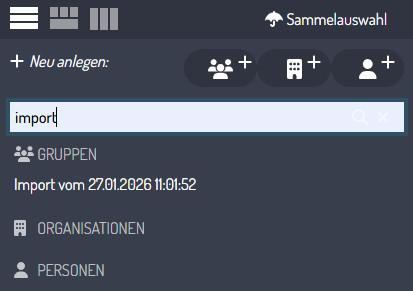
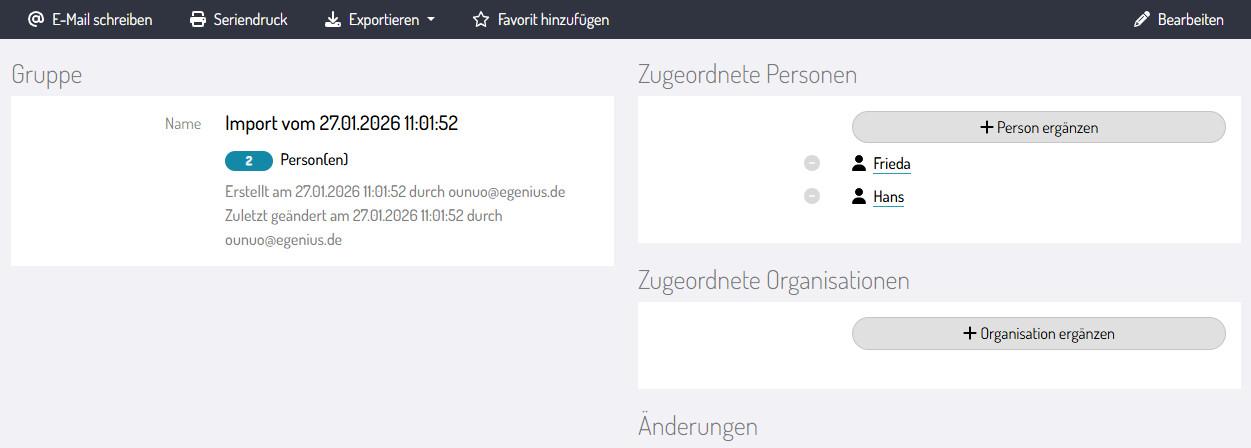
<span style="background-color: rgb(255, 255, 255); color: rgb(0, 0, 0);">Jeder Kontakt-Import wird in einer Import-Gruppe gebündelt. Für einen schnellen Überblick besteht der Gruppen-Name zusätzlich aus Datum und Uhrzeit des Imports.</span>

<span style="background-color: rgb(255, 255, 255); color: rgb(0, 0, 0);">Um Ihre importierten Kontakte zu finden, geben Sie oben in der Kontakt-Suche Import ein und bestätigen Sie mit der Enter-Taste.</span>

<span style="background-color: rgb(255, 255, 255); color: rgb(0, 0, 0);">![Import-Gruppe-suchen.jpg](https://docs.ounuo.de/uploads/images/gallery/2026-01/scaled-1680-/import-gruppe-suchen.jpg)</span>

##### <span style="background-color: rgb(255, 255, 255); color: rgb(20, 137, 167);">Mehrere Möglichkeiten</span>

![Ausgewählte-Import-Gruppe.jpg](https://docs.ounuo.de/uploads/images/gallery/2026-01/scaled-1680-/ausgewahlte-import-gruppe.jpg)

Nun haben Sie mehrere Möglichkeiten.

- **Waren Ihre Kontakte bereits vorsortiert?** (z.B. alle Kontakte, die Ihren Newsletter erhalten sollen) Dann können Sie z.B. die Gruppe umbenennen. Alle Kontakte bleiben gebündelt in der Gruppe.
- Wollen Sie alle **Kontakte von der Import-Gruppe lösen**, so können Sie einfach die Gruppe löschen (klicken Sie dazu auf **Bearbeiten** -&gt; **Gruppe löschen**). Die Kontakte sind bereits gespeichert und verbleiben im System.
- **Die Import-Gruppe soll bestehen bleiben:** Kein Problem, dann müssen Sie nichts weiter tun.

#### <span style="background-color: rgb(255, 255, 255); color: rgb(20, 137, 167);">Kontakt existiert bereits?</span>

<span style="background-color: rgb(255, 255, 255); color: rgb(0, 0, 0);">Im Kapitel Dublettenverwaltung erfahren Sie alles über <span style="color: rgb(35, 111, 161);">[Dubletten](https://docs.ounuo.de/link/133)</span>.</span>

#### <span style="background-color: rgb(255, 255, 255); color: rgb(20, 137, 167);">Sie benötigen individuelle Felder?</span>

<span style="color: rgb(0, 0, 0);">Weitere Informationen zu den [individuellen Feldern](https://docs.ounuo.de/link/64) finden Sie im Kapitel Kontakte.</span>

<div drawio-diagram="182"><img src="https://docs.ounuo.de/uploads/images/drawio/2025-02/drawing-5-1739436327.png" alt=""/></div>